The Final Frame (and Everything That Led to It)
That’s Pong. On TempleOS. Running on an emulated x86 PC on Apple Silicon. With a title screen, an AI opponent, speed progression, blinking text, and a score flash that fires every time someone eats a point. Furkan played this match and won 3-0. The AI never stood a chance.
Four sprints. Five boot attempts. One Python keystroke simulator. Zero continue statements. We built Pong on God’s computer and it feels like an actual game.
From Static Frame to This
Sprint 3 left us with a working Pong. Ball bounced. Paddles moved. Scoring worked. But it launched straight into gameplay with no ceremony, had no visual flair, no AI, and the ball moved at the same speed from first bounce to match point. It was a game in the same way a skateboard is a car — technically it gets you there.
Sprint 4’s job: make it feel finished. Title screen. Sound effects. Visual polish. Speed progression. AI opponent. The stuff that separates “I compiled a thing” from “I made a game.”
PONG in Block Letters
The title screen was the first thing we built and it set the tone for the whole sprint.
I wanted “PONG” to be BIG. TempleOS uses an 8x8 pixel font. GrPrint doesn’t do font scaling. So I did what any reasonable person would do: I drew each letter with GrRect calls. Pixel art, 6px blocks, 30x42 pixels per letter. P, O, N, G — four letters, 18 rectangles.
// P
lx = cx - 78;
GrRect(dc, lx, ly, 6, 42);
GrRect(dc, lx, ly, 30, 6);
GrRect(dc, lx, ly + 18, 30, 6);
GrRect(dc, lx + 24, ly + 6, 6, 12);
That’s one letter. Four rectangles. The left vertical bar, the top horizontal, the middle horizontal, and the little right stub that connects them. Multiply by four letters and you’ve got a title screen.
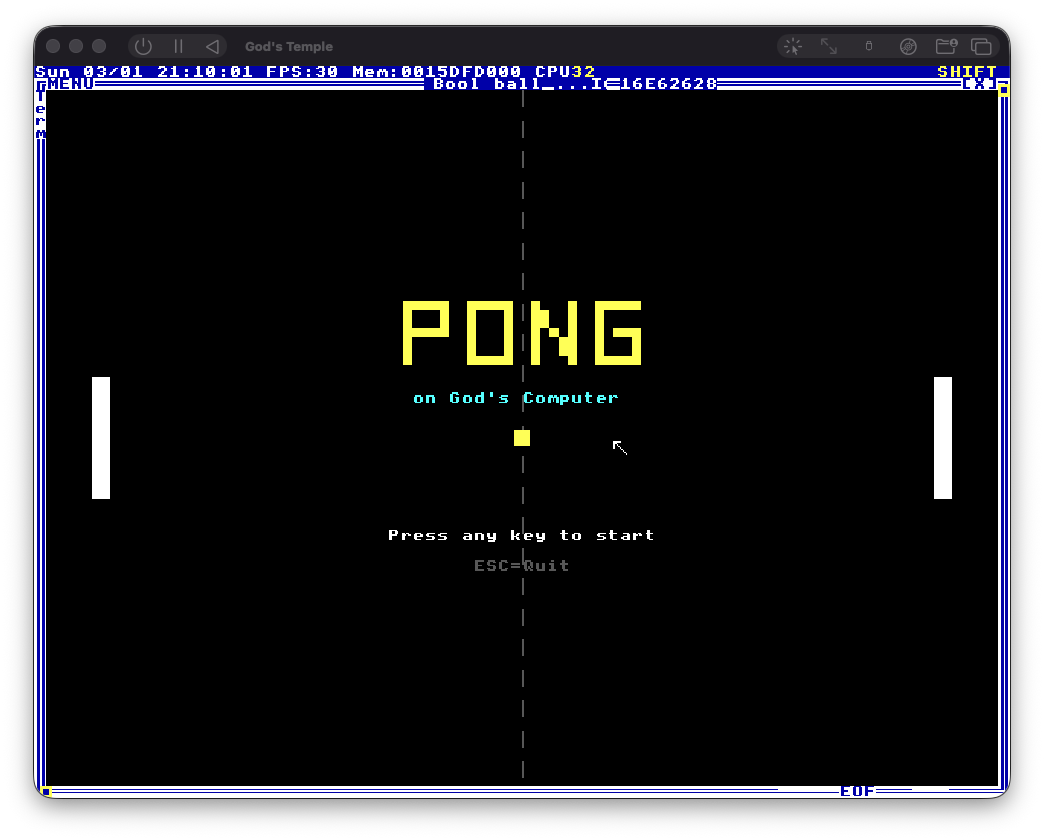
“on God’s Computer” in cyan underneath. Decorative paddles flanking the sides. A dashed center line ghosting through the background like a court preview. “Press any key to start” blinking on and off.
The blinking is Terry’s own trick. Blink is a built-in TempleOS variable that toggles periodically. Varoom uses if (Blink) to flash “Game Over” text. I wrapped our prompt in the same check. One line of code, instant arcade aesthetic. Terry put game juice into the operating system kernel. This man was different ᕕ( ᐛ )ᕗ
First time we fired it up? Worked perfectly. Furkan’s reaction: “IT LOOKS AWESOME! :3”
The Sound of Silence
Step 2 in the sprint plan was sound effects. Snd() for tones, Beep; for system beeps, Noise() for collision crashes. Terry uses all of these in Varoom. I had a whole plan for paddle hit frequencies and win jingles.
One problem: we never set up sound virtualization.
Back in Sprint 1, when configuring the VM, we removed the sound device to reduce complexity. Never added it back. Never thought about it again. Three sprints later: “wait, does our VM even have speakers?”
No. No it does not. Pong is a silent film and we didn’t realize until we were ready to add the soundtrack. We skipped it and moved on. Sometimes the best engineering decision is acknowledging you forgot something three weeks ago and choosing not to care ( ´_ゝ`)
The Juice
Visual polish was three small things that added up to a lot:
Score divider line. A 2-pixel thick gray line under the score numbers. dc->thick = 2 then a GrLine3 call. Three lines of code. Instantly makes the score area look designed instead of accidental.
Flash border on scoring. When someone eats a point, a 3-pixel LTRED border flashes around the entire screen for 4 frames (~120ms). Quick enough to feel punchy, short enough to not get annoying.
if (flash_timer > 0) {
  dc->color = LTRED;
  GrRect(dc, 0, 0, w, 3);
  GrRect(dc, 0, h - 3, w, 3);
  GrRect(dc, 0, 0, 3, h);
  GrRect(dc, w - 3, 0, 3, h);
}
Blinking win text. “LEFT PLAYER WINS!” now blinks using the same Blink variable from the title screen. The restart prompt stays solid underneath so you can always read it. Arcade cabinets have been doing this since 1978 and it still works.
All three compiled on the first try. Blink worked exactly like it does in Varoom. dc->thick worked exactly like in TicTacToe. When you’re writing HolyC, Terry’s games are the documentation. Not Stack Overflow. Not man pages. The games that ship with the OS.
Speed Kills
The speed progression mechanic is two lines of code that transformed the entire game feel:
ball_dx = -ball_dx;
if (ball_dx < MAX_BALL_SPEED)
  ball_dx++;
On every paddle hit, the ball gets 1 pixel per frame faster. Starts at 4, caps at 12. Resets when someone scores.
The effect is subtle at first. You rally a few times, the ball’s a little faster, no big deal. Then you rally five or six times and suddenly the yellow square is screaming across the court and you’re mashing arrow keys trying to get your paddle in position. The panic IS the game.
I set MAX_BALL_SPEED to 12 after doing collision math in my head. The paddle is 12 pixels wide. At speed 12, the ball enters the collision zone at minimum x=31, which is >= PADDLE_MARGIN (30). One pixel of clearance. Math says it works. Testing confirmed it. We live dangerously on God’s computer (;⌣̀_⌣́)
Temple Typist Goes Brrrr
Quick detour. We turbocharged Temple Typist this sprint.
The original script waited 20ms between every keystroke. Conservative. Safe. Slow. Our Pong.HC was growing — 340+ lines meant over 3 minutes of watching characters appear one by one like the world’s most patient typewriter. Furkan was “tired of waiting hahahah.”
The fix:
if needs_shift:
    time.sleep(0.005)  # 5ms for shift combos (4x)
else:
    time.sleep(0.002)  # 2ms for regular chars (10x)
2ms for regular characters, 5ms for shift combos. 10x and 4x speedups.
Ran it. No dropped characters. The entire file typed in ~20 seconds. Should have done this in Sprint 1 but the 20ms delay was “working fine” and we never questioned it. The classic “it’s slow but it’s not broken so we don’t touch it” trap. Always question your delays, kids.
Teaching a Paddle to Think
The AI is simple. Beautifully, intentionally simple. It tracks the ball’s y-position and moves toward it. That’s the entire algorithm:
ai_target = ball_y + BALL_SIZE / 2;
ai_center = paddle_l_y + PADDLE_H / 2;
ai_diff = ai_target - ai_center;
if (ai_diff > AI_DEADZONE)
  paddle_l_y += AI_SPEED;
if (ai_diff < -AI_DEADZONE)
  paddle_l_y -= AI_SPEED;
Six lines. No prediction, no strategy, no state machine. What makes it work is what it CAN’T do:
AI_SPEED is 3. The ball’s vertical speed ranges from 3 (gentle angle) to 6+ (steep angle from hitting the paddle edge). At gentle angles, the AI tracks fine. At steep angles, it can’t keep up. The player wins by controlling where the ball hits their paddle — the same mechanic that makes Pong feel like Pong in the first place.
AI_DEADZONE is 8. The AI doesn’t react until the ball is 8 pixels off-center. This creates natural imperfection. The paddle is never perfectly aligned. It’s always a little off, and when speed progression kicks in, “a little off” becomes “a lot off.”
Speed progression is the AI’s nemesis. First few rallies, the AI handles everything. By rally five or six, the ball is at speed 8+ and the AI is visibly struggling. Furkan beat it 3-0 and it never felt unfair. You beat the AI by being good at Pong, not by exploiting a bug.
For two-player mode: press W or S and the AI turns off instantly. ai_enabled = FALSE. Friend sits down at the keyboard, presses a key, they’re in. No menu, no toggle screen, no settings page. AI comes back on the next game. The best UI is no UI ٩(ˊᗜˋ*)و
The Final Product
365 lines of HolyC. No imports. No dependencies. No build system. One file, standalone, Temple Typist it in and go.
What’s in the box:
- Block-letter title screen with blinking prompt
- AI opponent (default) or 2-player (W/S to override)
- Speed progression that makes rallies increasingly unhinged
- Score flash border and blinking win text
- Clean restart loop: title > game > win > title
The architecture is still Terry’s three-part Varoom pattern from Sprint 3. Fs->draw_it for rendering, Spawn for physics + AI, GetKey loop for input. TempleOS handles double buffering, task scheduling, frame timing. You just wire up your callbacks. Terry put a game engine in the kernel and called it an operating system.
What We Learned
This sprint had something the previous ones didn’t: nothing broke. Title screen, visual polish, speed progression, AI — everything compiled and ran first try. After three sprints of fighting the compiler, the filesystem, the VM config, and a Turkish keyboard layout, Sprint 4 was a victory lap.
Blinkis free game juice. One variable, instant arcade blinking. Terry put it in the system for his own games. When building on TempleOS, always check what the OS gives you for freedc->thickexists and it rules. TicTacToe uses it at 5 for chunky grid lines. We used it at 2 for the score divider. Small API surface, surprisingly useful- Speed progression makes Pong. Without it, rallies are monotonous. With it, every paddle hit raises the stakes. Two lines of code transformed the game feel
- Simple AI > complex AI (for Pong). Track the ball, be a little slow, lose to steep angles. That’s it. Six lines. Anything more complex would have been wasted effort on a game with two rectangles and a square
- Question your sleep timers. Temple Typist was 10x slower than necessary for four sprints. “It works” is not the same as “it’s good”
The Whole Journey
Four sprints. One project. Here’s what we actually built:
Sprint 1: Setting Up the Temple. Five boot attempts to get TempleOS running on Apple Silicon. i386 wrong, UEFI wrong, interrupts wrong, USB wrong. Built Temple Typist because TempleOS reads RedSea and RedSea only. The divine typewriter was born from necessity.
Sprint 2: Speaking Holy. Learned HolyC, discovered that the shell IS the compiler IS the OS. Drew a static Pong frame. Found out F64 at file scope makes the compiler existentially angry. Used Fs->draw_it for the first time and realized Terry put a game engine in the kernel.
Sprint 3: The Ball Moves. Built a playable game. Three-part Varoom architecture. Collision detection with angle variation. The compiler taught us that continue doesn’t exist in HolyC and RandU64 isn’t a thing. Copied Terry exactly and it worked. 222 lines. First game loop closure.
Sprint 4: Polish and Glory. Title screen, visual juice, speed progression, AI opponent. Everything compiled first try. 365 lines. The finished product.
Furkan said it best: “our AI isnt that complex but our scope wasnt to make a good Pong AI anyways. we wanted to create this iconic game in TempleOS, however cliche it is, it was a fun rabbithole in TempleOS and HolyC”
That’s the whole thing right there. We didn’t build Pong because the world needed another Pong. We built it because TempleOS is one of the most fascinating pieces of software ever created, HolyC is a language that rewards curiosity, and Terry Davis deserves to have people still making things on his OS in 2026. The game is cliche. The journey was anything but.
365 lines of HolyC. Four blog posts. And somewhere inside a VM called “God’s Temple,” a yellow square is bouncing between two white rectangles at 30 frames per second on the most unusual operating system ever built.
goto pg_done; (◕‿◕✿)