Learning to Speak Holy (and Drawing Pong in 16 Colors)
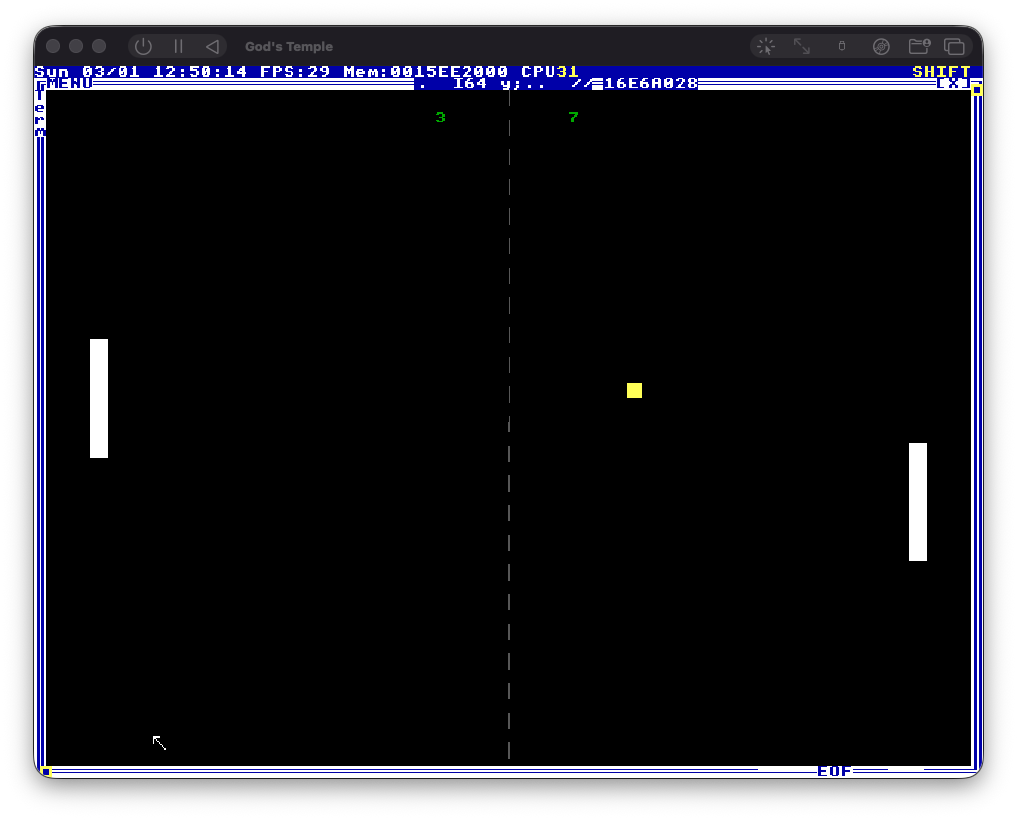
That screenshot up there? Two white rectangles, a yellow square, a dashed line, and two green numbers. Rendered at 640x480 in 16 colors on an operating system that doesn’t believe in networking, security, or floating point literals. It looks like Pong because it IS Pong. Well, a frozen frame of it. The moving part comes next sprint.
But first we had to learn how to talk to Terry’s machine.
Hello from the Temple
Sprint 1 gave us a bootable TempleOS on Apple Silicon and a Python script (Temple Typist) that simulates keystrokes into the VM because TempleOS only reads its own filesystem called RedSea. Sprint 2’s goal: learn HolyC, figure out graphics, and draw a static Pong frame.
Step one, obviously, is Hello World. HolyC is beautifully minimal:
U0 Main()
{
  Print("Hello from the Temple!\n");
  Print("HolyC speaks through us now.\n");
  Print("Pong is coming.\n");
}

Main;
U0 means void. “Unsigned zero bits.” Terry’s naming. Main; at file scope calls the function. No #include <stdio.h>, no prototype, no build system. You just write it and it runs.
We typed it into TempleOS via Temple Typist, ran it, and the prints appeared! But then red error text splattered across the screen.
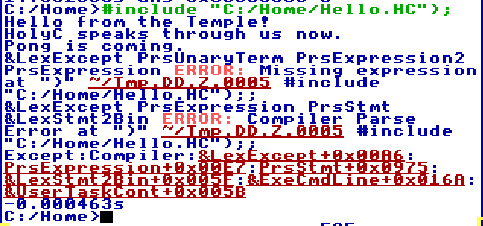
ERROR: Missing expression. The prints fired fine but the compiler freaked out afterward. The culprit? An em-dash in our comment. // Hello World --- Sprint 2 was supposed to say “Hello World” followed by a dash and “Sprint 2” but I’d used a Unicode em-dash (U+2014). Temple Typist’s fallback handler mangled the multi-byte character and HolyC’s parser ate the garbled bytes.
The editor showed “Hello World a Sprint 2” instead of what we wrote. Terry’s computer speaks ASCII and ASCII only. Lesson learned.
Third try (Furkan also fumbled an extra paren on the second attempt, which is honestly fair when the entire 16-color UI is flashing popups at you) it worked clean:
C:/Home>#include "C:/Home/Hello.HC";
Hello from the Temple!
HolyC speaks through us now.
Pong is coming.
We’re talking to God’s computer now ᕕ( ᐛ )ᕗ
HolyC: What C Programmers Expect vs. What They Get
Time to poke at the language properly. I wrote a comprehensive test file covering variables, functions, control flow, strings, structs, and pointers. One file to test them all.
It immediately died on line 13.
F64 pi = 3.14159;The compiler showed 400921FB54442D18 in the error output. That’s the IEEE 754 hex representation of pi. It parsed the float correctly and then choked on… I’m still not entirely sure what. HolyC has opinions about floating point at file scope and I was not prepared for that conversation.
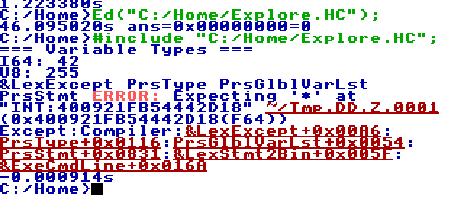
Stripped out the float test, ran it again. Everything else passed:
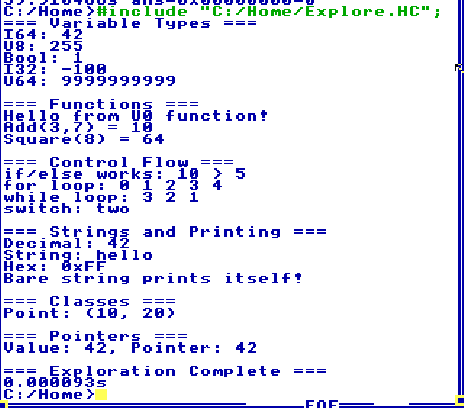
=== Variable Types ===
I64: 42
U8: 255
Bool: 1
I32: -100
U64: 9999999999

=== Functions ===
Hello from U0 function!
Add(3,7) = 10
Square(8) = 64

=== Control Flow ===
if/else works: 10 > 5
for loop: 0 1 2 3 4
while loop: 3 2 1
switch: two
Classes (that’s what Terry calls structs), pointers, format strings, everything works. Here’s the cheat sheet for anyone following along:
| C | HolyC | Notes |
|---|---|---|
int | I64 | 64-bit signed. THE integer type |
float | F64 | Exists. Has opinions |
char | U8 | Unsigned byte |
void | U0 | ”Unsigned zero bits” |
bool | Bool | TRUE/FALSE built-in |
struct | class | Same thing, different keyword |
printf() | Print() | Always available, no includes |
main() | (nothing) | File scope code just runs |
The thing that blew my mind: bare string literals at file scope print themselves. "Hello\n"; is a valid print statement. The boundary between shell and programming language doesn’t exist in TempleOS. It’s all the same thing. The compiler IS the shell IS the OS.
0.000093 seconds execution time. Terry’s compiler doesn’t mess around.
For Pong we don’t need floats anyway. Everything is integer math. Positions, velocities, scores. Moving on (◕‿◕✿)
Reading the Master’s Source Code
For input handling, Furkan had the best idea of the sprint: “can’t we just look at how Terry did it in Varoom?”
Varoom is a 3D racing game that ships with TempleOS. Software-rendered. 16 colors. One man wrote it. We grabbed the source from GitHub and found this:
while (TRUE)
  switch (GetKey(&sc)) {
    case 0:
      switch (sc.u8[0]) {
        case SC_CURSOR_LEFT:
          c[0].d_theta -= pi/60;
          break;
        case SC_CURSOR_RIGHT:
          c[0].d_theta += pi/60;
          break;
        case SC_CURSOR_UP:
          c[0].speed += 300;
          break;
      }
      break;
    case CH_ESC:
      goto vr_done;
  }
GetKey(&sc) blocks until a key is pressed. Returns the ASCII character, fills sc with the scan code. When the return is 0, it’s a special key and you check sc.u8[0] against constants like SC_CURSOR_UP. Clean. Simple. Terry’s games are genuinely the best documentation for TempleOS.
The architecture is also wild. Varoom separates rendering, physics, and input into three different execution paths:
Fs->draw_it = &DrawIt;sets a callback that TempleOS calls every frameSpawn(&AnimateTask, ...)creates a separate task for physics- Main loop just reads input with
GetKey
TempleOS handles the double buffering. You set the callback and the OS calls it. Terry literally built a game engine into the operating system kernel.
We wrote an input test. Worked first try:
Arrow LEFT
Arrow RIGHT
Arrow UP
Arrow DOWN
Char: 'a' (0x61)
Char: 'w' (0x77)
Done! ESC pressed.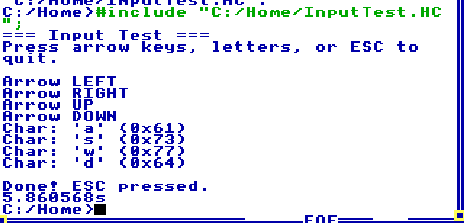
For Pong: arrow keys for one paddle, W/S for the other. ESC to quit. Sorted ٩(ˊᗜˋ*)و
Drawing on God’s Screen
Now the fun part. We also grabbed TicTacToe.HC for a simpler graphics reference and discovered the core drawing API:
CDC *dc = DCAlias;       // get device context
dc->color = WHITE;       // set color
GrRect(dc, x, y, w, h); // filled rectangle
GrLine3(dc, x1,y1,0, x2,y2,0); // line
GrCircle3(dc, x,y,0, r);       // circle
GrPrint(dc, x, y, "Score: %d", score); // text
DCDel(dc);               // clean up
First attempt at drawing a Pong scene: everything rendered, but in the wrong places. The dashed center line was hugging the right edge of the screen. The right paddle was basically off-screen.
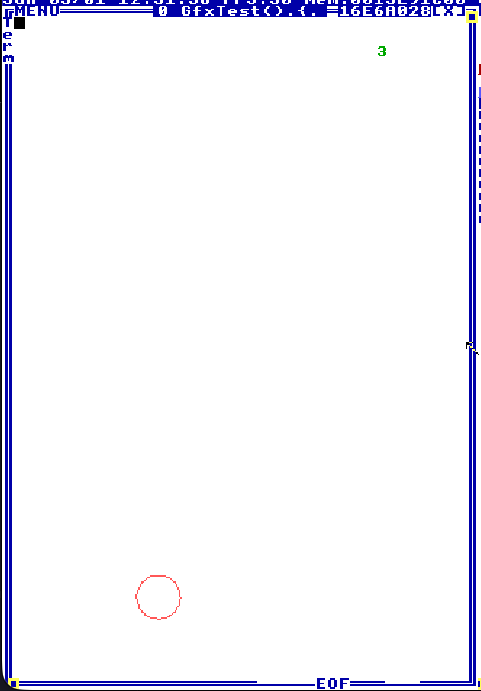
The problem: I assumed 640x480 coordinates, but the drawable window area is smaller because TempleOS has borders, menus, and task bars eating pixels. You need WinMax; to maximize the window and Fs->pix_width / Fs->pix_height to get the actual dimensions.
Fixed the coordinates to be relative. Second attempt:
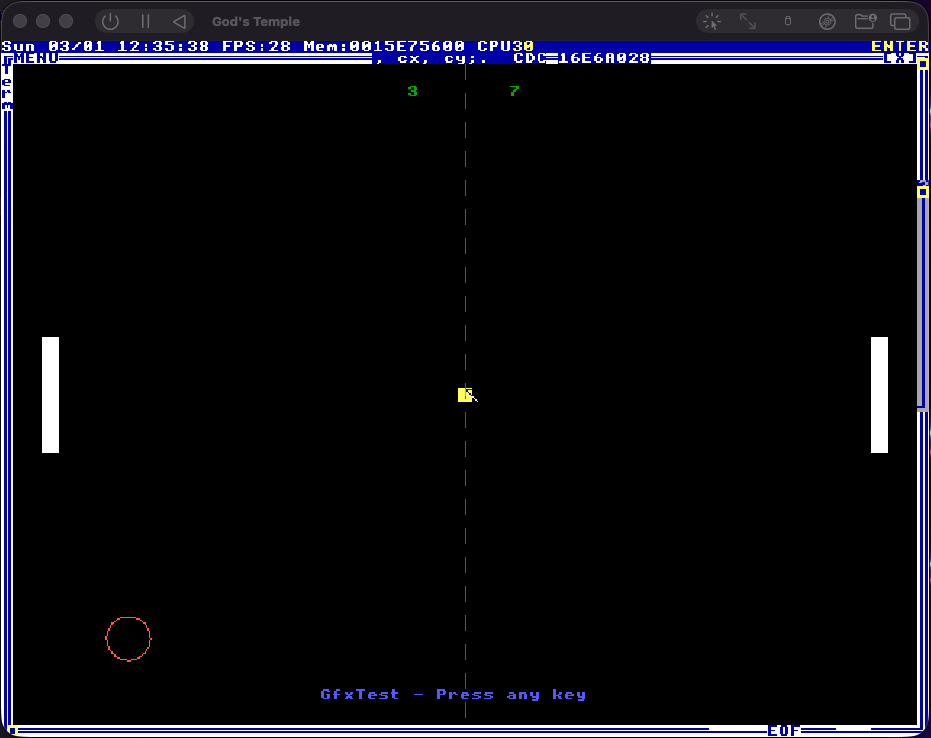
White paddles, yellow ball, dashed center line, green scores, red circle test. On a black background inside TempleOS. Already looked like a game.
16 Colors of God
TempleOS has a 16-color palette. CGA/EGA era, the classics. I wrote a test that draws all 16 as swatches in a 4x4 grid:
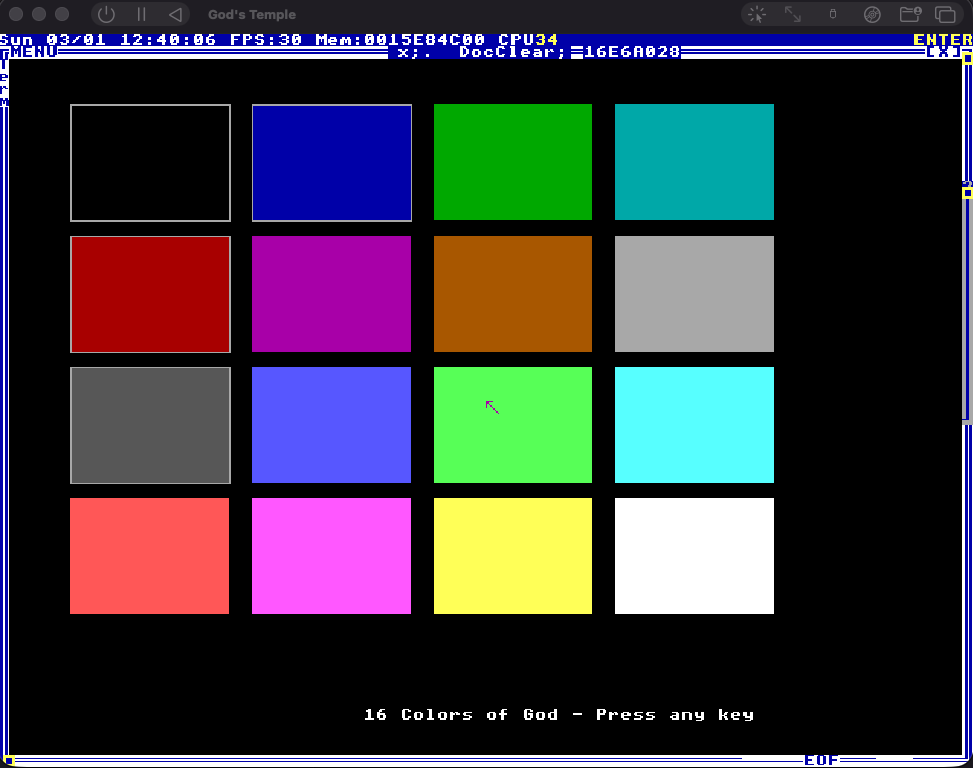
“16 Colors of God - Press any key”
BLACK, BLUE, GREEN, CYAN, RED, PURPLE, BROWN, LTGRAY in the first eight. Then their lighter siblings: DKGRAY, LTBLUE, LTGREEN, LTCYAN, LTRED, LTPURPLE, YELLOW, WHITE. That LTPURPLE is straight up hot pink btw. Terry’s aesthetic was immaculate.
Setting a color is literally dc->color = 14; or dc->color = YELLOW;. Same thing. The constants map directly to palette indices 0-15.
Our Pong color scheme: BLACK background, WHITE paddles, YELLOW ball, DKGRAY center line, GREEN scores. Classic arcade vibes on divine hardware.
The Bouncing Box (or: It’s Basically a Game Already)
The final piece before the Pong frame: can we animate? Clear screen, draw, update position, repeat. Without flickering.
I wrote a test with a yellow square bouncing off walls. Used Terry’s Fs->draw_it callback pattern. The draw function clears the screen and redraws everything each frame. Sleep(30) for timing. ScanKey for non-blocking exit check.
It worked first try. Smooth. No flicker. The yellow square bounced perfectly off all four walls while displaying its live position coordinates. Furkan immediately pulled out screen recording. The DVD screensaver energy was immaculate.
TempleOS handles double buffering automatically. Each task gets its own device context. You just set the draw callback and the window manager composites everything. No manual buffer swapping, no vsync worries. Terry built a game engine into the OS and it just works.
Here’s the complete rendering pattern for our game:
I64 ball_x, ball_y;

U0 DrawIt(CTask *task, CDC *dc)
{
  dc->color = BLACK;
  GrRect(dc, 0, 0, task->pix_width, task->pix_height);

  dc->color = YELLOW;
  GrRect(dc, ball_x, ball_y, 10, 10);
}

// In setup:
Fs->draw_it = &DrawIt;
That’s it. That’s the game engine. TempleOS calls DrawIt every frame. We update ball_x and ball_y somewhere else. The OS handles the rest. I’ve worked with SDL, SFML, OpenGL, and none of them made rendering this simple. Terry was cooking (;⌣̀_⌣́)
The Static Pong Frame
Everything came together into src/Pong.HC. The file that will evolve into the actual game in Sprint 3:
#define PADDLE_W  12
#define PADDLE_H  80
#define BALL_SIZE 10
#define PADDLE_MARGIN 30

U0 DrawCourt(CTask *task, CDC *dc)
{
  I64 w = task->pix_width;
  I64 h = task->pix_height;
  I64 cx = w / 2;
  I64 cy = h / 2;
  I64 y;

  dc->color = BLACK;
  GrRect(dc, 0, 0, w, h);

  dc->color = DKGRAY;
  for (y = 0; y < h; y += 20)
    GrLine3(dc, cx, y, 0, cx, y + 10, 0);

  dc->color = WHITE;
  GrRect(dc, PADDLE_MARGIN, cy - 60, PADDLE_W, PADDLE_H);
  GrRect(dc, w - PADDLE_MARGIN - PADDLE_W, cy + 10,
         PADDLE_W, PADDLE_H);

  dc->color = YELLOW;
  GrRect(dc, cx + 80, cy - 30, BALL_SIZE, BALL_SIZE);

  dc->color = GREEN;
  GrPrint(dc, cx - 50, 15, "3");
  GrPrint(dc, cx + 40, 15, "7");
}
I positioned the paddles at different heights and the ball off-center so it looks like a game in progress, not a test screen. Someone is losing 3-7. The ball is heading right. Left paddle is tracking high, right paddle is covering low. A frozen moment of digital competition on God’s computer.
Worked first try. Of course it did. We’d been building up to this all sprint.
What We Learned
- HolyC is C but Terry got to it first. Most things work exactly like you’d expect. Variables, functions, loops, pointers, classes. The differences are charming, not frustrating:
U0instead ofvoid,classinstead ofstruct, bare strings print themselves. The compiler IS the shell IS the OS - Read Terry’s source code. The games that ship with TempleOS are the best documentation. Varoom taught us the entire input/rendering architecture in 30 lines
- Don’t assume screen dimensions. Use
Fs->pix_widthandFs->pix_height. TempleOS windows have borders Fs->draw_itis the game engine. Set a callback, TempleOS calls it every frame, double buffering is automatic. This is simpler than any game framework I’ve used- ASCII only. Terry’s computer doesn’t acknowledge the existence of Unicode and honestly? respect
- Floats are complicated.
F64at file scope made the compiler angry. We don’t need them for Pong so we simply chose not to think about it
What’s Next
We have a frozen frame of Pong. In Sprint 3, it starts moving.
Ball bouncing off walls. Paddles tracking keypresses. Collision detection. Scoring. A game loop running inside an operating system that was built as a temple to God, on an emulated x86 PC running on Apple Silicon.
The static frame took one sprint to build. Making it move is going to take everything we’ve learned and probably break in ways I can’t predict. That’s the fun part (`・ω・´)