Context Enrichment
Some implementation details are redacted — this is a live product with real users. The patterns and approach are all here, the specifics that would make an attacker’s life easier are not. ᕙ(⇀‸↼‶)ᕗ
The simplest AI integration is a pipe: user says something, forward it to OpenAI, show the response. It works. It’s also kind of useless for anything domain-specific.
If someone asks Ceri “where should I charge?”, a generic chatbot can only give generic advice. “It depends on your location and vehicle!” Thanks, robot (¬_¬)
But Ceri knows that there are 7 stations within 10km, the closest fast charger is an Enerturk 120kW station 2.3km away, the user drives a Tesla Model 3 that fast-charges at 170kW, and ZES just dropped their DC price by 15% last week.
That’s the difference between a chatbot and an assistant. The difference is context.
The Pipeline
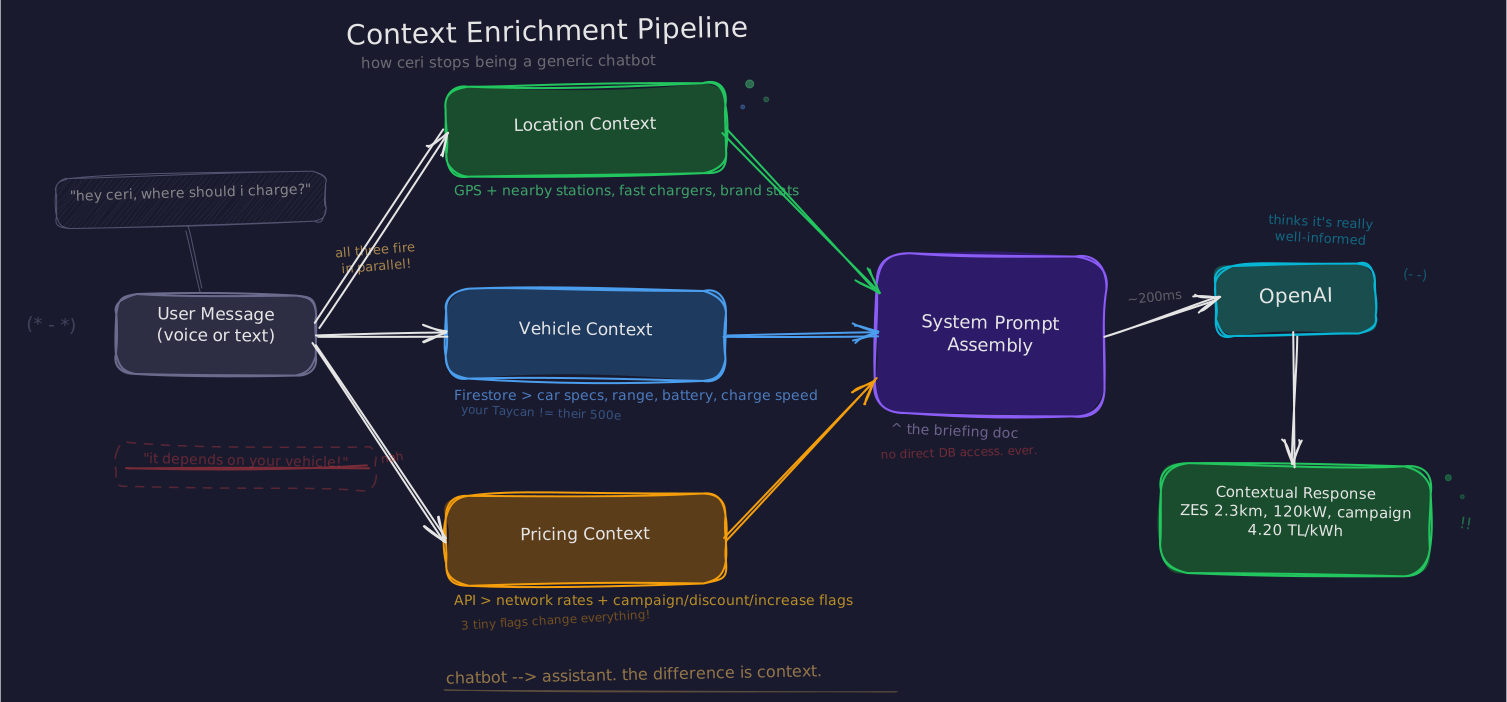
Every time a user sends a message — voice or text — three context builders run before anything reaches OpenAI:
final locationContext = await _getLocationContext(locale.languageCode);
final vehicleContext = await _getVehicleContext(locale.languageCode);
final pricingContext = await _getPricingContext(locale.languageCode);
Each one queries live data, formats it into natural language in the user’s locale, and returns a string. These strings get injected into the system prompt as labeled context blocks:
final response = await _openaiService.sendChatMessage(
  message: sanitizedMessage,
  conversationHistory: _convertToOpenAIMessages(previousMessages),
  userName: userName,
  locationContext: locationContext,
  vehicleContext: vehicleContext,
  pricingContext: pricingContext,
  locale: locale.languageCode,
);
The AI never touches a database. It reads a pre-built briefing document. This is intentional — giving an LLM direct database access is a security nightmare and a latency disaster on mobile. We control exactly what the AI sees, in what format, with what boundaries (◕‿◕)
Location: “Nearby” Is Not Enough
The location builder is the chunkiest one. It doesn’t just find nearby stations — it builds a tactical picture of the user’s charging landscape.
First, grab GPS and query nearby stations:
final location = _ref.read(userLocationProvider).value;
if (location == null) return null;

final stationsService = StationsService();
final nearbyStations = await stationsService.getNearbyStations(
  latitude: location.latitude,
  longitude: location.longitude,
  radiusKm: 10.0,
  limit: 10,
);
Then find the closest fast charger separately. This distinction matters — a 7kW AC station 500m away is technically “nearest” but useless if you need to charge in 30 minutes, not 8 hours:
final fastStations = nearbyStations
    .where((station) => station.maxPower > 50)
    .toList();

if (fastStations.isNotEmpty) {
  final closestFast = fastStations.first;
  final distance = DistanceService.calculateDistanceToStation(
    location, closestFast,
  );
  fastStationInfo = "En yakın hızlı şarj istasyonu: "
      "${closestFast.name} (${closestFast.brand}, "
      "${closestFast.maxPower}kW, "
      "[redacted]) - "
      "${distance.toStringAsFixed(1)}km uzaklıkta, "
      "${closestFast.address}. ";
}
Then aggregate stats — total station count, DC vs AC breakdown, and brand distribution. The brand distribution is surprisingly useful: if 3 out of 7 nearby stations are ZES, that’s worth knowing for pricing comparisons.
final totalDCStations = nearbyStations
    .where((s) => s.dcSocketCount > 0).length;
final totalACStations = nearbyStations
    .where((s) => s.acSocketCount > 0).length;

final brandCounts = <String, int>{};
for (final station in nearbyStations) {
  brandCounts[station.brand] =
      (brandCounts[station.brand] ?? 0) + 1;
}

final topBrands = brandCounts.entries.toList()
  ..sort((a, b) => b.value.compareTo(a.value));
final brandInfo = topBrands.take(3)
    .map((e) => "${e.key} (${e.value})")
    .join(", ");
Finally — and this is the sneaky part — a detailed station list with IDs:
final detailedStationsList = nearbyStations.take(10).map((station) {
  return "${station.name} (${station.brand}, [redacted])";
}).join(", ");
Those station identifiers are doing double duty. The AI sees them as source citations and naturally includes them in responses. The app’s chat UI parses those citations and turns them into tappable buttons that navigate to the station on the map.
The AI thinks it’s citing a source. The app turns citations into interactive elements. Neither side knows about the other’s job, and it just works ᕙ(⇀‸↼‶)ᕗ
Vehicle: Your Car Changes Every Recommendation
The difference between driving a Fiat 500e (85kW fast charge) and a Porsche Taycan (270kW) changes everything. A 50kW station is perfectly fine for the Fiat and a waste of time for the Porsche.
The vehicle builder pulls registered vehicles from Firestore, identifies the primary one, and builds a spec sheet:
final vehiclesRepository = _ref.read(vehiclesRepositoryProvider);
final vehicles = await vehiclesRepository
    .watchUserVehicles()
    .first
    .timeout(
      const Duration(seconds: 3),
      onTimeout: () => <UserVehicle>[],
    );
That 3-second timeout is important — this runs on every message. If Firestore is slow, we’d rather have no vehicle context than a frozen UI. The AI can still give decent advice without knowing your car. It can’t give any advice if the app is hanging (◕‿◕)
For each vehicle, we extract specs with a small conversion that matters more than it looks:
final isPrimary = vehicle.id == primaryVehicle?.id;
final specs = vehicle.specifications;

// Convert efficiency from Wh/km to kWh/100km
final efficiencyKwh100km = specs.efficiencyWhPerKm > 0
    ? (specs.efficiencyWhPerKm * 100 / 1000).toStringAsFixed(1)
    : 'N/A';

vehicleInfoList.add(
  "${isPrimary ? 'Ana Araç' : 'Araç'}: "
  "${vehicle.brandName} ${vehicle.modelName} ${vehicle.variantName} "
  "(${vehicle.nickname}). "
  "Menzil: ${specs.rangeKm > 0 ? specs.rangeKm : 'N/A'} km, "
  "Batarya: ${specs.batteryKwh > 0 ? specs.batteryKwh.toStringAsFixed(1) : 'N/A'} kWh, "
  "Hızlı Şarj: ${specs.fastchargeKw > 0 ? specs.fastchargeKw : 'N/A'} kW, "
  "Verimlilik: $efficiencyKwh100km kWh/100km."
);
The API stores Wh/km because that’s precise. The context presents kWh/100km because that’s what drivers think in. We don’t trust the AI with unit conversions — and honestly you shouldn’t either (´▽`)
Now when someone asks “can I make it to Ankara without stopping?”, the AI has real numbers — range, battery capacity, efficiency — and can do actual math instead of hedging with “it depends on your vehicle.”
Pricing: Three Flags That Change Everything
The pricing builder pulls the top 10 networks with their current per-kWh rates. The rates are broken down by connector type — AC and DC have different prices, and some networks have a separate tier for DC chargers under 60kW:
final chargingStationService = ChargingStationService();
final topStations = await chargingStationService
    .getTopRankedStations(limit: 10);

for (final station in topStations) {
  final prices = station.fiyat;
  final priceStr = <String>[];

  if (prices['AC'] != null && prices['AC']! > 0) {
    priceStr.add('AC: ${prices['AC']!.toStringAsFixed(2)} TL/kWh');
  }
  if (prices['DC'] != null && prices['DC']! > 0) {
    priceStr.add('DC: ${prices['DC']!.toStringAsFixed(2)} TL/kWh');
  }
  if (prices['DC_60_kW'] != null && prices['DC_60_kW']! > 0) {
    priceStr.add(
      'DC (60kW): ${prices['DC_60_kW']!.toStringAsFixed(2)} TL/kWh',
    );
  }
The numbers alone are useful. But three tiny flags transform them from a price table into actionable advice:
  final priceChanged = station.priceChanged;
  String changeIndicator = '';

  if (priceChanged != null && priceChanged.isNotEmpty
      && priceChanged != 'none') {
    changeIndicator = priceChanged == 'campaign' ? ' (Kampanya)' :
                      priceChanged == 'discount' ? ' (İndirim)' :
                      priceChanged == 'increase' ? ' (Zam)' : '';
  }

  pricingInfoList.add(
    '${station.marka}: ${priceStr.join(', ')}$changeIndicator',
  );
}
Campaign. Discount. Price increase. Without them, the AI compares static numbers. With them, it says “ZES is running a campaign right now, DC dropped to 4.20 TL/kWh — that’s the cheapest near you” instead of just listing rates. Three flags turn data into recommendations.
The System Prompt
All three context strings land in the system prompt as labeled sections. The prompt itself tells the AI who it is and how to behave — in the user’s language:
The system prompt builder takes the three context strings and assembles them as labeled sections, appended after [redacted]:
String locationInfo = locationContext != null
    ? '\n\n[redacted]:\n$locationContext'
    : '';
String vehicleInfo = vehicleContext != null
    ? '\n\n[redacted]:\n$vehicleContext'
    : '';
String pricingInfo = pricingContext != null
    ? '\n\n[redacted]:\n$pricingContext'
    : '';

return '''$systemPrompt$locationInfo$vehicleInfo$pricingInfo''';
Each context block only appears when its builder returned data. No location permission? No location section. No registered vehicles? No vehicle section. The AI adapts to whatever information is available instead of hallucinating what it doesn’t have.
Ceri gets separate full prompts for Turkish, English, and German — not translations, but locale-native phrasings. She’s told to keep responses short, to reference the user’s vehicle naturally, and to cite station identifiers so the app can make them tappable.
The whole enrichment pipeline adds maybe 200-300ms to each request — one location read, one Firestore query, one API call. On a 3-4 second OpenAI round trip, that’s noise. But the difference in response quality is the difference between a toy and a tool.
The AI doesn’t know it’s being fed a briefing. It just thinks it’s really well-informed (◕‿◕)
Both files are longer than they should be and shorter than they could be — production code, in other words. ꒰ᐢ⸝⸝•‧̫•⸝⸝ᐢ꒱